Book an intro call
Case study · URBANIS PortalBaumgardt Consultants · URBANIS

How URBANIS inspects rental units at stations, even without reception

For Baumgardt Consultants, Imping Digital built the URBANIS Portal. Inspectors rate rental units at railway stations right on their phones, with photos and even without reception; evaluation and Excel export are ready in the office.

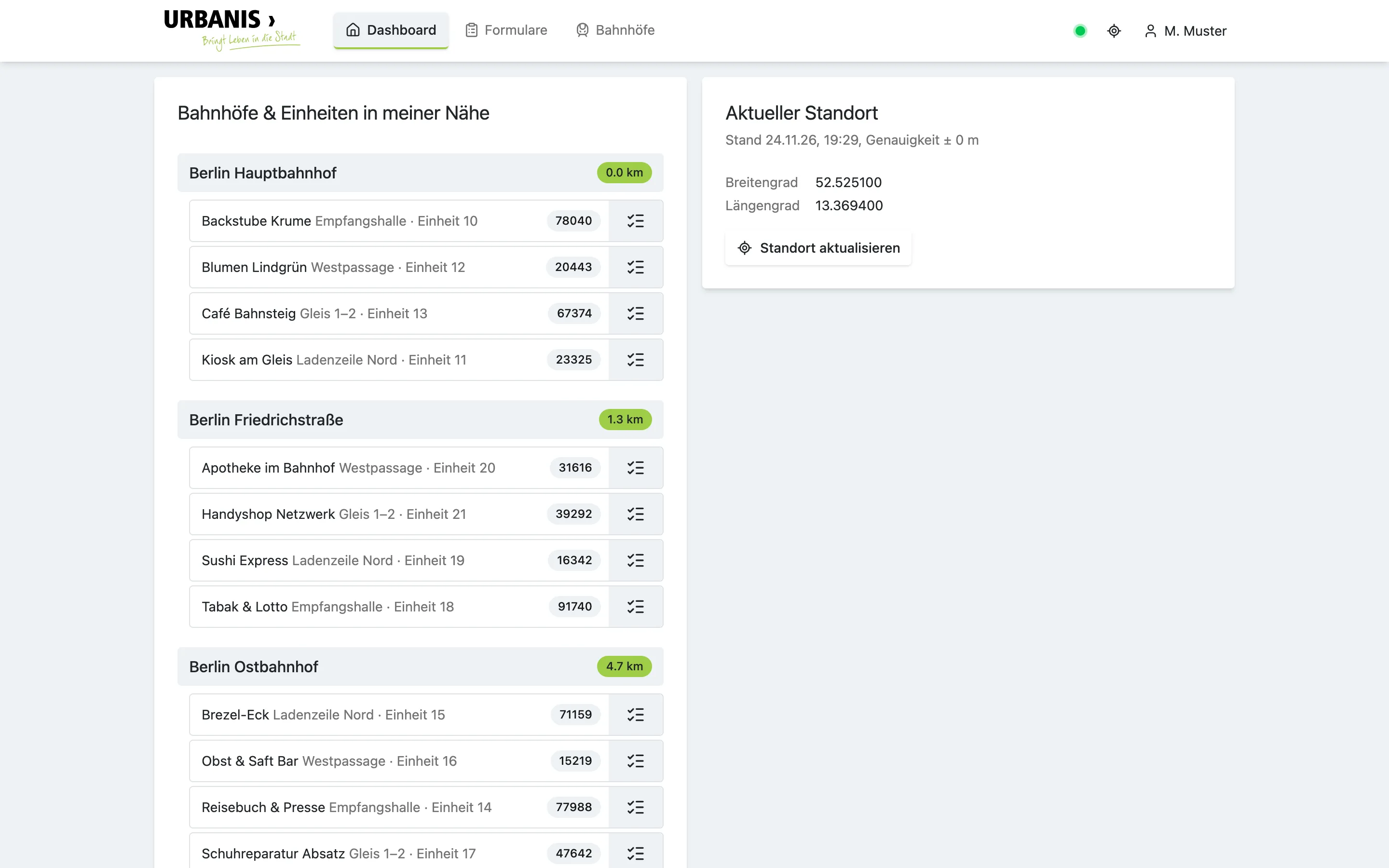
Stations and units nearby
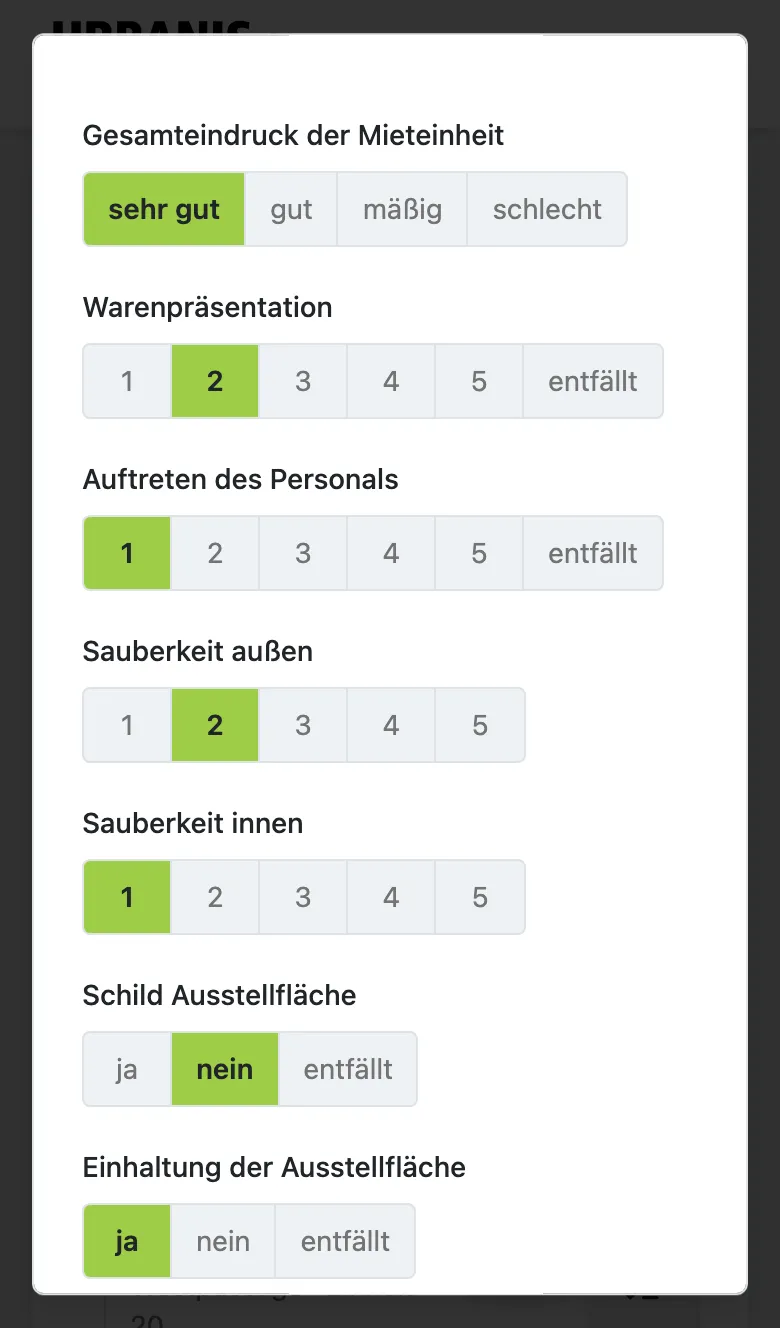
Rating form on a smartphone
ResultOfflinesurveys at stations
Result
Offline surveys at stations
Period
2020+
Project
Inspections of rental units at railway stations
Building blocks
Stations by distance, TOM and M+V forms, Offline capture

Planning something similar? Tell us about it. In the free first call we’ll work out what your project needs and what it costs.

Discuss your project

Starting point

Railway stations house many rental units: shops, kiosks, food outlets. URBANIS inspects them on site at regular intervals, from the overall impression to illuminated advertising, price labelling, escape routes, smoke detectors and pests.

Inspectors walk through the station, often in basements or passages with weak reception. Paper forms or an app that stops working offline cost time there and leave gaps in the data.

Then there is the evaluation: whoever compiles the results in the office needs complete inspections with date, photos and remarks, sorted by station and rental unit, and a file for further work.

The decision

In 2020, Baumgardt Consultants commissioned Imping Digital to build a portal that runs as a web app on the phone and keeps working offline. There are two forms: TOM with 21 checkpoints and M+V with 11 checkpoints.

Questions and answer scales live in a single place in the code. Capture, display and export all use it, so a checkpoint has the same name and is evaluated the same way everywhere.

Each inspection belongs to a team, a station and a rental unit. Stations have coordinates; rental units also have a location, business type and cost centre. Users do not sign themselves up; they are created centrally.
Approach

How we went about it.

01

Offline queue

Inspections without reception are stored on the device and sent later.

02

One source for forms

Questions and scales of TOM and M+V live in one place for capture, display and export.

03

Location first

Stations appear sorted by distance from the current location.

04

Photos and export

Photos kept per team, evaluation with filters and Excel export.

The build

On opening, the portal lists stations sorted by distance from the current location. Inspectors pick the rental unit, fill in the form and attach photos. Without reception, inspections go into a queue on the device and are sent as soon as it is back online.

In the office, inspections can be filtered by form, period and individual answers, viewed one by one and exported as an Excel file. Photos are stored per team and can only be opened by that team.

A service worker keeps the app files and recently visited pages on the device. That way the portal still opens when the connection drops on entering a station.

Stations and units nearby
Dashboard with stations and rental units sorted by distance – demo data.
Rating form on a smartphone
The TOM form on a smartphone, fillable even without reception.

In operation

In autumn 2026 we rebuilt the portal on Laravel 13, Inertia and Vue 3. Look and workflow stayed as before, so inspectors could carry on without retraining. Inspections from the previous system are still displayed and exported correctly.

The portal runs in Docker containers with a queue worker and scheduler, shipped through GitHub Actions. Backups go to external storage daily, and Sentry reports errors from backend and frontend.

Tests run against MariaDB because the distance calculation happens in the database. Static analysis and consistent formatting check every change before it ships.

What runs today
  • In use since 2020
  • Two forms with 21 and 11 checkpoints
  • Rebuilt in 2026 with all legacy data carried over

3 learnings from the project

  1. 1
    Offline from the start

    Working inside a station needs an app that keeps running offline.

  2. 2
    Keep what is familiar

    The rebuild kept look and workflow and renewed the technology underneath.

  3. 3
    One definition, many uses

    Defining forms in one place keeps capture and export in sync.