Book an intro call
Case study · SWB FahranlagenBaumgardt Consultants · SWB Bonn

How SWB Bonn keeps the status of its lifts and escalators up to date

For Baumgardt Consultants, Imping Digital built the application in which SWB Bonn records faults and maintenance of its lifts and escalators. An API passes the status on to passenger information.

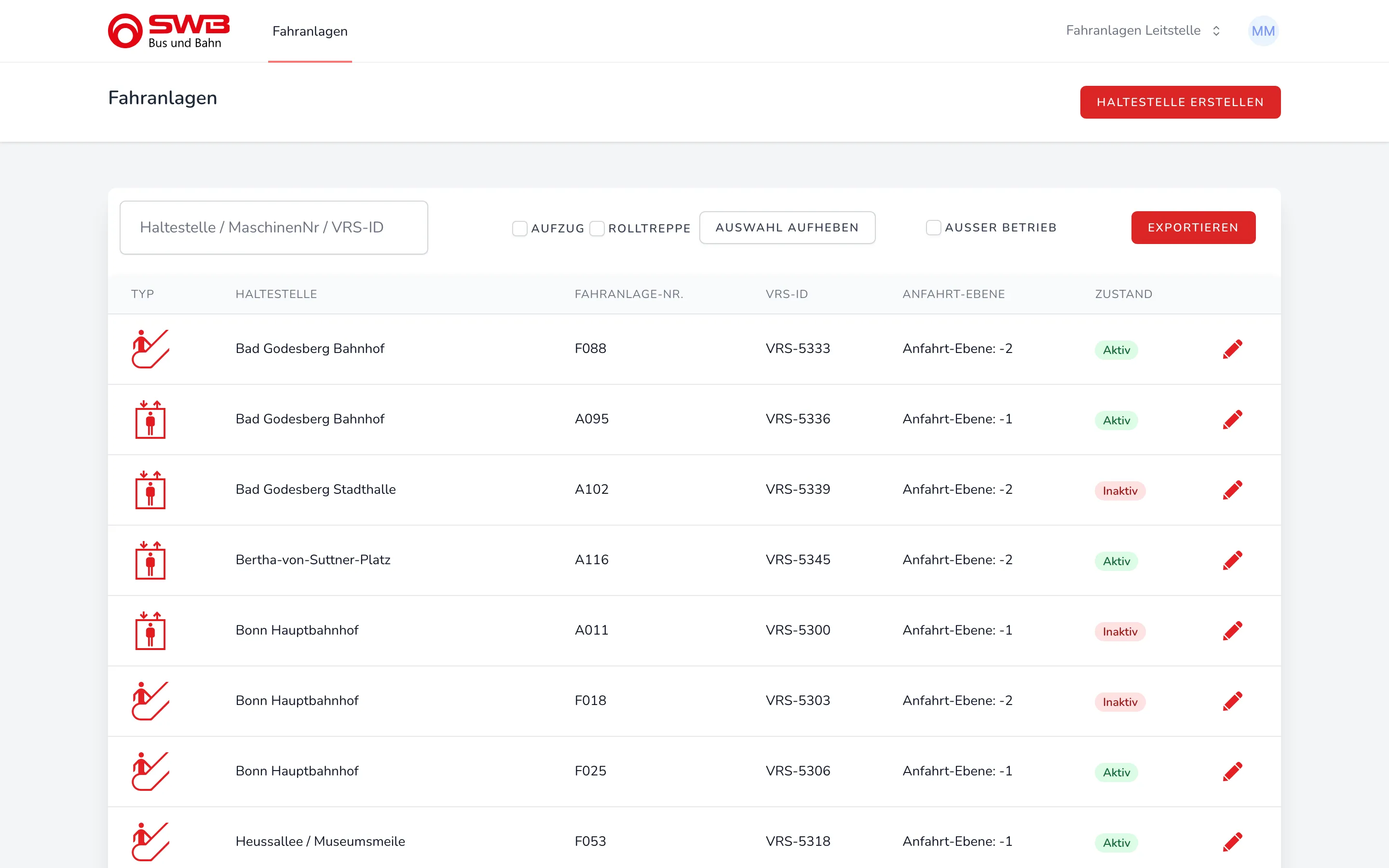
List of lifts and escalators
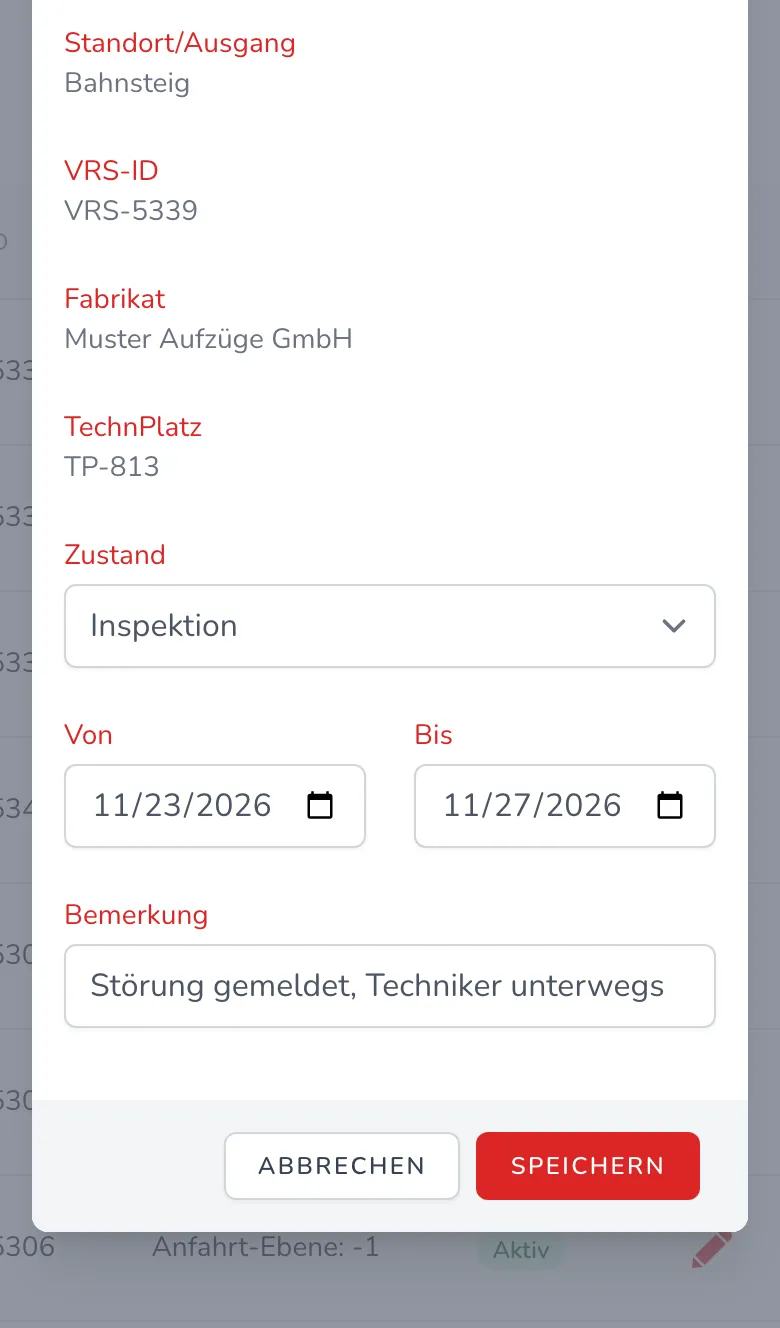
Changing the status of a lift
Resultsince 2017in operation
Result
since 2017 in operation
Period
2017+
Project
Status for the lifts and escalators of SWB Bonn
Building blocks
Unit list with status, Fault and maintenance with time span, CSV export

Planning something similar? Tell us about it. In the free first call we’ll work out what your project needs and what it costs.

Discuss your project

Starting point

Stadtwerke Bonn operates lifts and escalators at its stops. When a unit fails or is being serviced, it affects everyone travelling with a wheelchair, a pram or heavy luggage. This information has to be maintained quickly, reliably and in one place.

The status also has to appear where passengers look: in passenger information and with other consumers. What was needed was a tool for maintaining the data and an interface for passing it on.

The unit data previously lived in a legacy system and had to be carried over in full. The goal was a tool that is straightforward to use, needs little upkeep and runs reliably for many years.

The decision

Baumgardt Consultants commissioned Imping Digital to build a lean web application. Each unit is a record with stop, type, machine number, level, location, VRS ID, manufacturer and technical location.

Three states are enough for the status: running, maintenance and repair. Whoever enters a fault sets a time span and a note. Once the time span has passed, the system resets the status on its own.

Only signed-in members of a team have access. Administrators create new units and colleagues directly, without invitation emails. External consumers get their own API tokens with a rate limit.
Approach

How we went about it.

01

Three clear states

Running, maintenance or repair, each with a time span and a note.

02

Automatic reset

A job checks expired faults every minute and resets them.

03

API and CSV

Six token-protected endpoints and a CSV export for selected units.

04

Safe operations

Docker deployment with automatic migrations and nightly backups.

The build

The first version was built in 2017; in 2021 we rebuilt the application on Laravel and Jetstream. The unit list can be searched, and selected units can be exported as a CSV file.

External systems connect through a token-protected API: all units, escalators only, lifts only, stops with a combined status, and single stops and devices. A job checks every minute whether fault reports have expired.

The overview marks each unit in colour as running, under maintenance or under repair. Matching notices for passengers are included, for example that work on clearing the fault is under way.

List of lifts and escalators
Lifts and escalators per stop with their current status – demo data.
Changing the status of a lift
On mobile: record a fault or inspection with period and remark.

In operation

The application runs in Docker containers, built and shipped through GitHub Actions. Database migrations run automatically on deployment; if one fails, the previous version stays live. Backups are made every night and kept in external storage, and Sentry reports errors.

In autumn 2026 we upgraded the application to Laravel 13, PHP 8.5 and Jetstream 5 and tested it against a copy of the live data. The passenger information site swb-mobil.de keeps reading the unit status through the API.

The application has deliberately stayed small: one data model, one overview, one API. That keeps updates manageable and the effort for upkeep and operations low over the years.

What runs today
  • In use at SWB Bonn since 2017
  • Status flows into swb-mobil.de through the API
  • Upgraded to Laravel 13 and PHP 8.5 in 2026

3 learnings from the project

  1. 1
    Keep it small

    A clearly scoped tool has run for years with little upkeep.

  2. 2
    Automate the routine

    Automatic resets prevent stale fault reports.

  3. 3
    Test with real data

    The upgrade was checked against a copy of the live data.